 Author
 |
Topic: semi-transparent sprite (Read 1729 times) |
|
tsh73
Guest
|
 |
Re: semi-transparent sprite
« Reply #3 on: Feb 12th, 2012, 8:06pm » |
|
Well, it "kind of" works, so one might find it useful.
I used this to make semi-transparent hairline on a slide rule.
JB forum::JB Programs Shared ::Slide rule
And it indeed works in LBB, and semitransparent too - just cyan instead of red. 
(yes I know I could check if program works under LBB and change color).
|
|
 Logged Logged
|
|
|
|
Richard Russell
Administrator
member is offline

 
Posts: 1348
|
|
Re: semi-transparent sprite
« Reply #4 on: Feb 12th, 2012, 9:01pm » |
|
on Feb 12th, 2012, 8:06pm, Guest-tsh73 wrote:| And it indeed works in LBB, and semitransparent too. |
|
It's impossible for a sprite mask in LBB to be semi-transparent - it's a 1-bit-per-pixel black-and-white bitmap!
In the slide-rule program what you've made (in LBB) is an XOR sprite, in other words the cursor exclusive-ORs whatever lies beneath it with red. So when it covers the white background it appears cyan, and when it covers the black scale or text it appears red.
I mentioned before that LBB's sprites are in fact icons, and that's how they work. There's an AND bitmap (the mask) and an XOR bitmap (the foreground). In a conventional LB sprite you always arrange that where the AND bitmap is white (allowing the background through) the foreground bitmap is black. But if you have some non-black foreground in that region it will plot in an XOR fashion.
In principle I could modify LBB's sprites to have a genuine transparent mask, but it wouldn't be compatible with what LB does so I don't see any point.
Richard.
P.S. The slide rule program is very nice indeed, and (apart from the graticule colour) I'm pleased that it seems to work so well in LBB too!
|
|
|
|
Richard Russell
Administrator
member is offline
Posts: 1348
|
|
Re: semi-transparent sprite
« Reply #5 on: Feb 18th, 2012, 5:06pm » |
|
on Feb 9th, 2012, 3:55pm, Richard Russell wrote:| If LB had been performing a true transparency I might have wanted to try to emulate it, but evidently what it actually does is something strange |
|
I take it back: it's not LB misbehaving, it's your program! The norm in Windows is for sprites/icons to have a pre-multiplied foreground; that is, the sprite's foreground should be multiplied by the alpha value (transparency). You are not doing that in your program, which is why the background circles appear red instead of black. If you modify the code like this then it works as one would expect:
Code:for i = 0 to 255
#gr "color black"
#gr "line ";i;" ";0;" ";i;" ";d
#gr "color red"
#gr "line ";i;" ";d;" ";i;" ";2*d
c$=i;" ";i;" ";i
#gr "color ";c$
#gr "line ";i+256;" ";0;" ";i+256;" ";d
c$=255-i;" ";0;" ";0
#gr "color ";c$
#gr "line ";i+256;" ";d;" ";i+256;" ";2*d
next
As LB appears to implement the transparency correctly (assuming a pre-multiplied foreground), I will attempt to do so in LBB too.
Richard.
|
|
Logged
|
|
|
|
tsh73
Guest
|
|
Re: semi-transparent sprite
« Reply #6 on: Feb 20th, 2012, 07:25am » |
|
Quote:| The norm in Windows is for sprites/icons to have a pre-multiplied foreground; that is, the sprite's foreground should be multiplied by the alpha value (transparency). You are not doing that in your program, |
|
I was never aware of it. Looks really interesting.
Thanks for the info.
I will do some tinkering with that, when time permits.
|
|
Logged
|
|
|
|
Richard Russell
Administrator
member is offline
Posts: 1348
|
|
Re: semi-transparent sprite
« Reply #7 on: Feb 20th, 2012, 09:17am » |
|
on Feb 20th, 2012, 07:25am, Guest-tsh73 wrote:| I will do some tinkering with that, when time permits. |
|
In your slide rule program you could usefully change this line:
Code:to
Code:
Since the 'transparency' value for the line is set to 192 (lightgray) the amplitude of the 'foreground' shouldn't exceed 63, so that when it is superimposed on a white background it doesn't clip.
You probably won't see any difference, but this change would give a slightly more realistic 'semi-transparent' line if it was superimposed on a more complex background.
Richard.
|
|
Logged
|
|
|
|
tsh73
Guest
|
|
Re: semi-transparent sprite
« Reply #8 on: Feb 20th, 2012, 10:11am » |
|
Quote:| You probably won't see any difference |
|
Exactly.
But it always nice to know "why".
|
|
Logged
|
|
|
|
Richard Russell
Administrator
member is offline
Posts: 1348
|
|
Re: semi-transparent sprite
« Reply #9 on: Feb 25th, 2012, 5:40pm » |
|
on Feb 18th, 2012, 5:06pm, Richard Russell wrote:| I take it back: it's not LB misbehaving |
|
I know I keep changing my mind, but LB definitely isn't exhibiting true transparency. Try running this program under both LB (4.04) and LBB (1.80):
Code:'LB vs LBB difference
nomainwin
WindowWidth = 600
WindowHeight = 300
open "test" for graphics_nsb as #gr
#gr "trapclose [quit]"
#gr "down"
loadbmp "bg", "C:\progra~1\libert~1.04\sprites\bg1.bmp"
#gr "background bg"
d=130
for i = 0 to 255
c$=i;" ";i;" ";i
#gr "color ";c$
#gr "line ";i;" ";0;" ";i;" ";d
#gr "color black "
#gr "line ";i;" ";d;" ";i;" ";2*d
next
#gr "Getbmp sprite 0 0 256 ";2*d
#gr "Addsprite sprite sprite"
#gr "Spritexy sprite 0 0"
#gr "SpriteScale sprite 234"
#gr, "Drawsprites"
wait
[quit]
close #gr
unloadbmp "sprite"
unloadbmp "bg"
end
Under LBB the transparency works as you would expect, with the sprite being fully opaque on the left and fully transparent on the right, with a gradual transition.
But under LB the sky and the clouds behave as they do in LBB, but the mountains and the rest of the background behave as though the sprite is fully opaque in the left half and fully transparent in the right half:
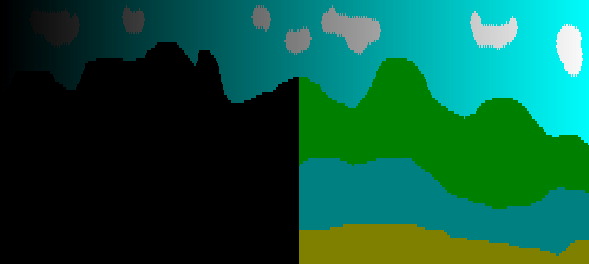
In other words, depending on the background colour the sprite exhibits both linear transparency (like LBB does now) and binary transparency (like LBB did previously). My mind is boggling at this result - it appears to make no sense at all!
Richard.
|
|
Logged
|
|
|
|
|




