 Author
 |
Topic: Limitations of Syntax Coloring (Read 3159 times) |
|
tsh73
Full Member
member is offline


Gender: 
Posts: 210
|
 |
Re: Limitations of Syntax Coloring
« Reply #22 on: Sep 21st, 2016, 6:39pm » |
|
I wonder if this depends on richtextbox control version, which might be depending on Windows version?
Here on XP home SP3 sysinternals process explorer shows that LBB loaded
windows\system32\riched20.dll
version 5.30.0023.1230
|
|
 Logged Logged
|
|
|
|
Richard Russell
Administrator
member is offline

Posts: 1348
|
|
Re: Limitations of Syntax Coloring
« Reply #23 on: Sep 23rd, 2016, 08:41am » |
|
on Sep 21st, 2016, 6:39pm, tsh73 wrote:| I wonder if this depends on richtextbox control version, which might be depending on Windows version? |
|
Although there are certainly several different versions of the Rich Edit control, I don't think that's a likely cause of the anomaly. I still believe that the underlying issue is the PC's language selection.
There are several different ways in which a PC can be configured for different locales, among which are the keyboard layout, the default display language, the default Code Page and the input method. My guess is that based on some or all of these settings the Rich Edit control tries to determine whether the selected font contains all the characters that are likely to be required, and if not performs a font substitution.
Richard.
|
|
Logged
|
|
|
|
Richard Russell
Administrator
member is offline
Posts: 1348
|
|
Re: Limitations of Syntax Coloring
« Reply #24 on: Sep 23rd, 2016, 5:44pm » |
|
I notice that there is an 'unofficial Unicode extension' of the FixedSys font called Fixedsys Excelsior. If this works well it might make it possible to use FixedSys, or something very much like it, without triggering the font-substitution issue that has caused so much aggravation.
Perhaps somebody who has been experiencing the Rich Edit anomaly could try this font and report back on whether it fixes the problem. Here is the download link for the TTF file. As usual, once downloaded you should right-click on the file and select Install.
Richard.
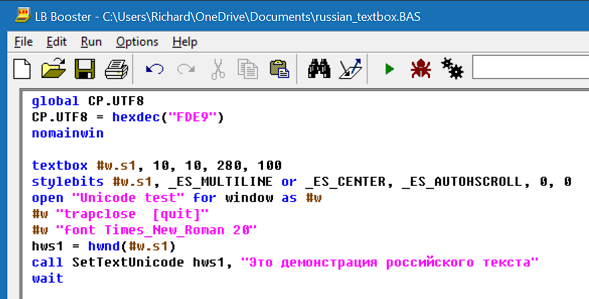
|
|
Logged
|
|
|
|
tsh73
Full Member
member is offline
Gender:
Posts: 210
|
|
Re: Limitations of Syntax Coloring
« Reply #25 on: Sep 24th, 2016, 06:14am » |
|
Quote:Perhaps somebody who has been experiencing the Rich Edit anomaly could try this font and report back on whether it fixes the problem.
|
|
It looks like it fixes things for me.
|
|
Logged
|
|
|
|
tsh73
Full Member
member is offline
Gender:
Posts: 210
|
|
Re: Limitations of Syntax Coloring
« Reply #26 on: Sep 24th, 2016, 06:41am » |
|
Err...
Richard, does LBB IDE uses Alt-Shift for anything?
It is one of two common hotkeys for switching input language, in my case English/Russian
So while testing I found that in LBB 3.05 I can paste russian text, can switch language by mouse (by applet in system tray), but somehow I cannot switch language by pressing Alt-Shift.
I have separate folder with LBB 2.51 - and Alt-Shift switches language there.
|
|
Logged
|
|
|
|
Richard Russell
Administrator
member is offline
Posts: 1348
|
|
Re: Limitations of Syntax Coloring
« Reply #27 on: Sep 24th, 2016, 08:47am » |
|
on Sep 24th, 2016, 06:41am, tsh73 wrote:| does LBB IDE uses Alt-Shift for anything? |
|
No, but something strange is happening here (Windows 10 laptop) because if I press and release Alt - rather than using Alt+letter as a menu shortcut - it seems to freeze the LBB IDE. If that's happening to you too it may well impact on your hotkey.
I'm away from home at the moment so I can't investigate further, but that should definitely not be happening.
Richard.
|
|
Logged
|
|
|
|
Richard Russell
Administrator
member is offline
Posts: 1348
|
|
Re: Limitations of Syntax Coloring
« Reply #28 on: Sep 24th, 2016, 12:07pm » |
|
on Sep 24th, 2016, 06:41am, tsh73 wrote:| does LBB IDE uses Alt-Shift for anything? |
|
Further to my earlier reply, although LBB doesn't use Alt+Shift itself, Rich Edit controls do, and of course the LBB editing pane is a Rich Edit control. There is a list of keyboard shortcuts here and you will notice that it includes Alt+Shift+X, Alt+Shift+Ctrl+F11 and Alt+Shift+Ctrl+F12.
So it is possible that the Rich Edit control is intercepting your Alt+Shift hotkey and preventing it doing what it normally does. Probably Alt+Shift is a poor choice of hotkey if it is already used for other purposes in standard Windows components like the Rich Edit control.
Richard.
|
|
Logged
|
|
|
|
tsh73
Full Member
member is offline
Gender:
Posts: 210
|
|
Re: Limitations of Syntax Coloring
« Reply #29 on: Sep 24th, 2016, 4:15pm » |
|
Quote:| Probably Alt+Shift is a poor choice of hotkey |
|
It's default Windows language switching hotkey.
That mean bigger part of Russia and what not uses it on daily basis, at least since Windows 3x.
|
|
Logged
|
|
|
|
Richard Russell
Administrator
member is offline
Posts: 1348
|
|
Re: Limitations of Syntax Coloring
« Reply #30 on: Sep 24th, 2016, 9:19pm » |
|
on Sep 24th, 2016, 4:15pm, tsh73 wrote:| It's default Windows language switching hotkey. |
|
There's clearly an anomaly in Microsoft having used the same key combination as both a language-switching hotkey and as a modifier for some Rich Edit keyboard shortcuts. It's exactly the sort of thing they are usually careful to avoid.
I see that (from Windows 8 onwards anyway) you can use Windows+Space as a hotkey to bring up the language-selection menu, so I wonder if that might be a workaround for your issue. On this PC Windows+Space allows me to switch between a UK and US keyboard layout.
Richard.
|
|
|
|
Richard Russell
Administrator
member is offline
Posts: 1348
|
|
Re: Limitations of Syntax Coloring
« Reply #31 on: Sep 25th, 2016, 12:45pm » |
|
on Sep 24th, 2016, 08:47am, Richard Russell wrote:| something strange is happening here (Windows 10 laptop) because if I press and release Alt - rather than using Alt+letter as a menu shortcut - it seems to freeze the LBB IDE. |
|
I've now had a chance to check this on other machines and the problem seems to be specific to this Windows 10 laptop. I've tested it on Windows XP, Windows 7, Windows 8.1 and a desktop Windows 10 PC and in every case pressing-and-releasing Alt works normally. So it doesn't seem likely that whatever is causing this problem is related to the Alt+Shift hotkey issue.
It has nevertheless been interesting to discover the keyboard shortcuts built into the Rich Edit control, a few of which could be genuinely useful in LBB. For example you can enter any character by typing its hexadecimal code value and then pressing Alt+X, so to enter a capital eth character you can type 00D0 followed by Alt+X giving Ð
Richard.
|
|
Logged
|
|
|
|
tsh73
Full Member
member is offline
Gender:
Posts: 210
|
|
Re: Limitations of Syntax Coloring
« Reply #32 on: Sep 25th, 2016, 2:20pm » |
|
Hello Richard
it happens that I have previous versions of LBB saved on a harddisk
so I can check.
So: Sintax coloring with richtextbox appeared in version 3.0
Versions 3.0, 3.01,3.02,3.03 - language switching with Alt-Shift works
Versions 3.04,3.05,3.06 - language switching with Alt-Shift no more work.
So it is something introduced in version 3.4.
May be this?
Quote:IDE enhancements:
The IDE now incorporates a combobox in which are listed all the branch labels, SUBs and FUNCTIONs in the currently loaded program. Selecting one of these causes the editor to jump directly to the appropriate program line. You can choose whether to sort the list alphabetically or in the order in which the items appear in the program. |
|
|
| « Last Edit: Sep 25th, 2016, 2:20pm by tsh73 » |
Logged
|
|
|
|
Richard Russell
Administrator
member is offline
Posts: 1348
|
|
Re: Limitations of Syntax Coloring
« Reply #33 on: Sep 25th, 2016, 3:44pm » |
|
on Sep 25th, 2016, 2:20pm, tsh73 wrote:| So it is something introduced in version 3.4. |
|
Well, the first thing to say is that Alt+Shift works here in LBB 3.06: If I press that key combination the language indicator in the Taskbar switches between 'ENG' and 'ENG US'. So whatever the problem is, it is not universal.
The change in v3.04 that affected your system was probably running the Rich Edit control in a separate thread in order to improve the support for Unicode, particularly the entry of complex script languages like Arabic. Up to version 3.03 the control was run in the same thread as the rest of the IDE.
As you will appreciate, I would not want to reverse that change - users who need support for Arabic (like SarmedNafi) would not be happy! Running the Rich Edit control in a separate thread also improves performance with multi-core CPUs. In any case there is no good reason why it should affect hotkeys.
So all things considered, and especially given that Alt+Shift works perfectly here in LBB 3.06, I am not contemplating making any changes.
Richard.
|
|
|
|
Richard Russell
Administrator
member is offline
Posts: 1348
|
|
Re: Limitations of Syntax Coloring
« Reply #34 on: Sep 25th, 2016, 4:02pm » |
|
on Sep 25th, 2016, 3:44pm, Richard Russell wrote:| Well, the first thing to say is that Alt+Shift works here in LBB 3.06 |
|
Just checked it on my other machines: the Alt+Shift language switching is working perfectly in LBB 3.06 with Windows 7, Windows 8.1 and Windows 10.
Richard.
|
|
Logged
|
|
|
|
tsh73
Full Member
member is offline
Gender:
Posts: 210
|
|
Re: Limitations of Syntax Coloring
« Reply #35 on: Sep 25th, 2016, 5:20pm » |
|
Checked on another my machine and another virtual one, LBB 3.06.
Alt-shift works.
So it dosn't work only with my main home pc.
Ah well. I could live with it.
EDIT
and on my job PC it does't work as well.
|
| « Last Edit: Sep 26th, 2016, 06:19am by tsh73 » |
Logged
|
|
|
|
CryptoMan
New Member
member is offline
Gender:
Posts: 46
|
|
Re: Limitations of Syntax Coloring
« Reply #36 on: Sep 26th, 2016, 2:49pm » |
|
Fixedsys Excelsior works fine with Turkish.
Thanks.
|
|
Logged
|
|
|
|
|





